
BIG Phone is part of the BIG Launcher suite, available on Google Play. Download and install BIG Launcher on any Android mobile. A free version is available, so you can try it for as long as you need and upgrade later if you want the full feature set.
Step 1 — Set BIG Launcher as the default home screen
During setup, Android will ask which launcher to use. Select BIG Launcher and set it as the default. The large-icon home screen replaces the standard Android home screen.
Step 2 — Open BIG Phone from the app drawer
BIG Phone appears as one of the core apps in BIG Launcher. Tap it to open.
Step 3 — Set BIG Phone as the default dialler
Android will prompt you to set BIG Phone as the default phone app. Confirm this, and it will replace the standard dialler for all incoming and outgoing calls.
Step 4 — Add your contacts and favourites
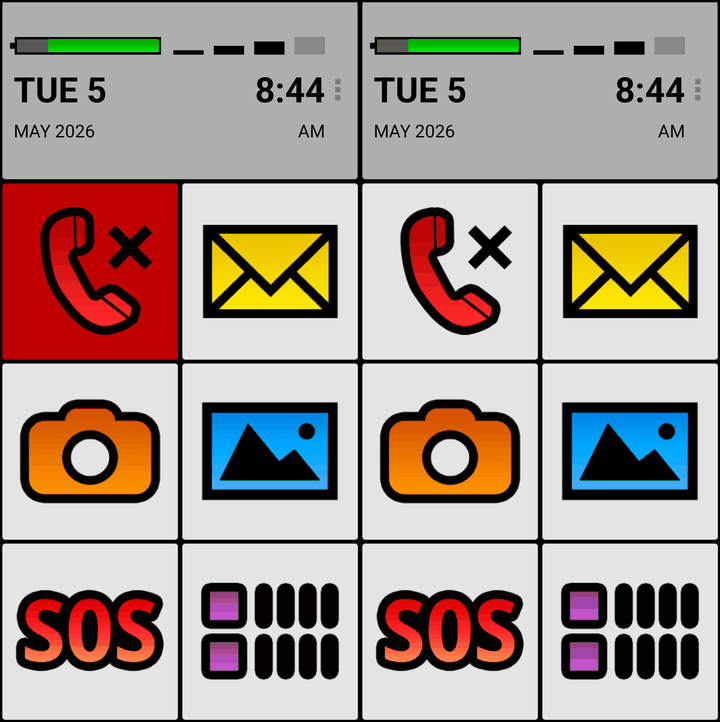
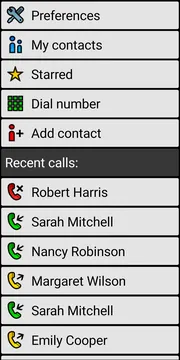
Import or add the contacts you use most often. Select up to five as favourites — they will appear on the BIG Phone home screen for immediate one-tap access. For most families, that short list covers close family, the GP surgery, the local pharmacy, and a carer or trusted neighbour.
Step 5 — Adjust ringtone and call settings
Set ringtone volume, enable screen flash for incoming calls, and turn on unknown number blocking if needed. That is the full setup.
From this point on, calls work the same way they always have — just with a much cleaner and more readable interface.
Who It’s For
BIG Phone is designed for seniors who find standard phone apps confusing or physically difficult to use, and for the family members and carers who want to help set up a more practical solution.
The independent senior who wants fewer mistakes
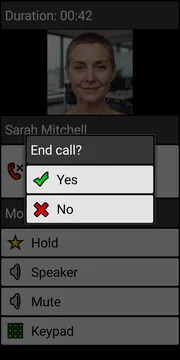
Margaret is 74 and lives alone. She has no trouble making calls, but she occasionally rings the wrong person because the text in her contacts list is too small. With BIG Phone’s large photos and names, she picks the right contact every time.
The senior with hearing or vision challenges
Robert is 81 and has moderate hearing loss. He sometimes misses calls because the ringtone does not cut through background noise at home. The loud ringtone combined with full-screen flash means he is far less likely to miss a call.
The adult child managing a parent’s phone
Sarah’s mum lives in another city. Sarah set up BIG Launcher and BIG Phone on her mum’s mobile during a visit. She added five key contacts as favourites — herself, her brother, her mum’s GP surgery, and two neighbours — and enabled unknown number blocking. Her mum now makes and receives calls without confusion, and Sarah does not need to provide phone support every week.
BIG Phone as Part of BIG Suite
BIG Phone is one of five apps that make up the BIG Launcher suite. Each app replaces a standard Android function with a simpler, senior-focused version. Together they create a consistent, easy-to-use experience across the whole phone.
BIG Launcher — The home screen replacement. Large icons, clear labels, and a layout designed to reduce confusion. The foundation of the entire suite.
BIG SMS — A simplified messaging app with large text, easy contact selection, and a clear send button. Works alongside BIG Phone so that both calls and texts use the same simplified interface.
BIG Alarm — A straightforward alarm and reminder app. Large display, easy to set, easy to dismiss. Useful for medication reminders and appointments.
BIG Notifications — Enlarges Android system notifications and can show them full-screen with large text. Seniors can read them more easily and use notification actions without digging through the original app.
All five apps are included in a single purchase. BIG Launcher has been available for 15 years, has over 2 million users, and holds a 4.3-star rating on Google Play.
Try BIG Launcher for Free
BIG Phone is included with BIG Launcher. You can start with the free version and see whether the large buttons and simple layout work well for you or your family.
If it fits your needs, you can later buy the full version to unlock all features. The free version is not time-limited — it simply has some feature restrictions.
Visit biglauncher.com to learn more and choose the version that suits you.
