
“Mom, what do you see on your screen right now?”
“Well… some kind of window. And there’s something blue at the bottom.”
Twenty minutes into the call, and you still don’t know what Mom is looking at. If you could see her screen, it would take a minute. This guide covers three ways to see your parents’ Android phone screen remotely, what each can do, and which one lets you help without worrying that a stranger could get in the same way.
At a glance
- Just need to see the screen? Use screen sharing during a WhatsApp video call.
- Want to tap for your parent, too? General-purpose tools such as TeamViewer QuickSupport can do that. But anyone your parent gives the code to can connect, so scammers use them, too.
- Want to see the screen, tap for your parent, and know that only family can connect? That’s what BIG Remote Help is for: the phones must be paired in person the first time, using a QR code.
What you need beyond a phone call
You need three things: to see what your parents see, show them where to tap, and occasionally do it for them. There’s a fourth that’s easy to overlook: they need to be able to start it all themselves, without you there to help.
1. WhatsApp: when seeing the screen is enough
During a WhatsApp video call, your parent opens the three-dot menu, chooses screen sharing, and confirms the Android prompt. You can then see their screen, with both of you still visible below it.
- When it’s enough: your parents already use WhatsApp, and you just need to read what popped up on their phone.
- Its limits: you can only watch. You can’t point to where they should tap or do anything for them. Your parent also has to find the right option on their own during the call, which is often the hardest step.
2. TeamViewer QuickSupport and similar tools: powerful, but open to anyone
TeamViewer QuickSupport is a technical support tool. After your parent opens the app, shares their ID or enters a code, and confirms the connection, the other person can see their screen and control the phone.
Technically, it works. The problem is who your parent gives the code to. Someone who calls pretending to be from a bank or the police wants exactly this: for your parent to install an app and read out a number. The FBI advises: “Do not give unknown, unverified persons remote access to devices or accounts.”
When you teach your parents that reading out a code is a normal way to get help, you’re also teaching them the step this scam relies on.
3. BIG Remote Help: remote help for family only
BIG Remote Help is an app from the makers of BIG Launcher, which has been downloaded over 2 million times since 2011. It was made for one situation: family helping an older adult with their phone. It’s a video call where you can see your parent’s screen and, with their permission, tap for them.
How it works
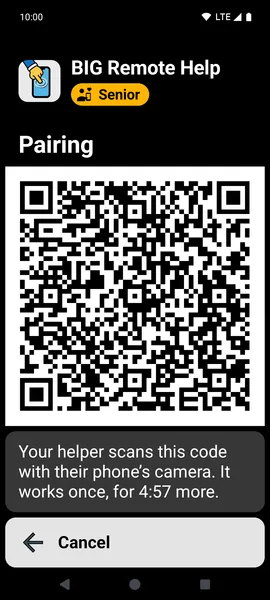
- Pair the phones during a visit. A QR code appears on Mom’s phone, and you scan it with yours. That first pairing can’t happen remotely, by design: a stranger can’t pair with her phone over a phone call.
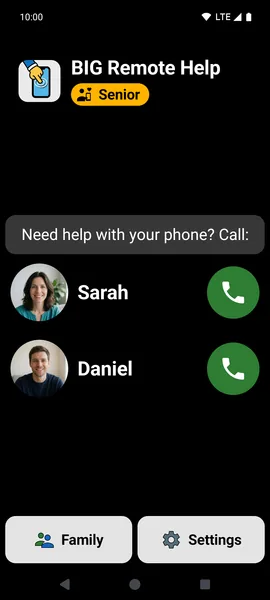
- Mom calls you with one tap on the button with your photo. When you call her, her phone rings like a regular call, even when it’s locked.
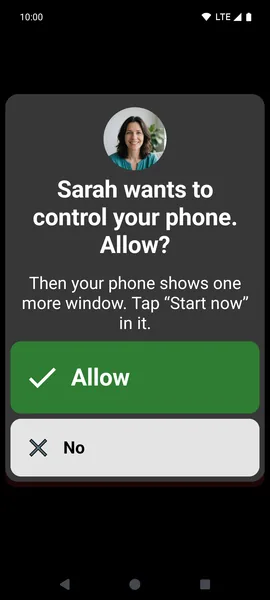
- You can see and hear each other. When she needs help, you ask to see her screen. She taps “Allow” and then “Start now” in the next window. The app tells her what to expect.
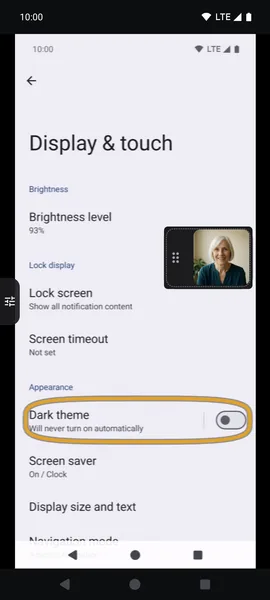
- You can see her screen. Use a circle to show her where to tap, or tap for her. Her touch always takes priority, and she can end the help session with one large button.
- Banking stays private. When Mom opens a banking or payment app that BIG Remote Help recognizes, screen sharing and control pause automatically.
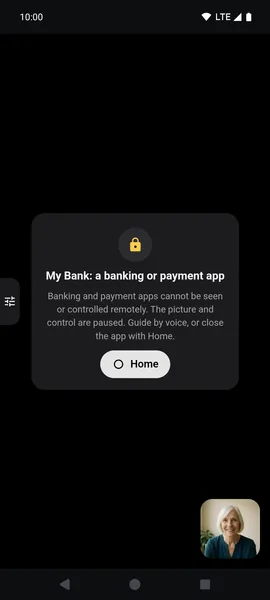
Calls and the shared screen are encrypted from device to device, and nothing is recorded. You can help from the Android app, a web browser on a computer, or an iPhone. On an iPhone, it works through a browser and with limitations; it works best between two Android phones.
What it costs
You get 15 minutes of calls per month for free, enough for quick advice. Control is also free for the first 30 days; after that, you can still see the screen and point out where to tap. If you need more, there’s Premium in the BIG Apps Suite PREMIUM bundle (3 hours of calls per month, with control on every call) or a Gold subscription with unlimited calls.
Comparison at a glance
| TeamViewer QuickSupport | BIG Remote Help | ||
|---|---|---|---|
| See your parent’s screen | yes | yes | yes |
| Tap for your parent | no | yes | yes, with their permission (free for the first 30 days) |
| See each other while helping | yes | no, just chat | yes, it’s a video call |
| Who can connect | anyone on a video call with your parent | anyone your parent gives their ID or code to | family only: first pairing in person by QR code; Mom confirms additional family members |
| What your parent needs to do | find screen sharing during the call and confirm the prompt | open the app, share their ID, and confirm the connection | tap “Accept” then “Allow” then “Start now”; the app guides her with large buttons |
When BIG Remote Help isn’t a good fit
- Your parents have an iPhone. BIG Remote Help is for Android phones. Between iPhones, FaceTime offers screen sharing and, outside the EU, remote control as well (iOS 18 or later).
- You want to fix the phone when no one is there. Android doesn’t let anyone do that: the person holding the phone has to confirm screen sharing every time.
- You want to set it up remotely the first time. The first pairing must happen in person.
Your next visit: 3 minutes that save you hours
- Install BIG Remote Help from Google Play on Mom’s phone and yours.
- Go through the guided setup together. It takes about 3 minutes.
- Scan the QR code on her phone.
- Try the first call while you’re still at the table. Let Mom tap “Allow” herself and then end the help session on her own.
One rule for your parents, whatever you use
Tell them in plain terms: “Don’t install anything or read anything out when someone on the phone tells you to. I’ll set up remote help for you in person when I visit.” The FBI advises against giving unknown, unverified people remote access to devices or accounts.
Sources and verification
- WhatsApp help: “How to share your screen” (checked November 12, 2026).
- TeamViewer QuickSupport, app description on Google Play (checked November 12, 2026).
- Federal Bureau of Investigation (FBI): “FBI Warns Public to Beware of Tech Support Scammers Targeting Financial Accounts Using Remote Desktop Software” (published October 18, 2022).
- Apple Support: “Request or give remote control in a FaceTime call on iPhone” (checked November 12, 2026).
Frequently asked questions
Can I control my parents’ phone without them knowing?
No. On Android, the person holding the phone must confirm screen sharing. In BIG Remote Help, Mom also approves each help session separately and can end it with one button.
Can I help from an iPhone?
Yes, with limitations. The BIG Remote Help app is for Android, so on an iPhone you help through a web browser at remote.biglauncher.com. The iPhone won’t ring on its own when your parents call, so you need to keep the page open. It works best between two Android phones.
Is BIG Remote Help free?
Yes, the free version includes 15 minutes of calls per month and has no ads.
Do my parents need BIG Launcher?
No. BIG Remote Help works on its own.
Which phones does it work on?
The app works on Android 8.0 or newer. Your parents’ phone must always run Android.
Key takeaways
- WhatsApp is enough if you just need to see the screen. To tap for your parent, you need a remote help tool.
- With general-purpose tools, access comes down to the code. Whoever gets it can connect.
- BIG Remote Help requires the phones to be paired in person the first time, so only family can help.
